Webster Bank online banking is a simple, user-friendly way to take care of all your banking needs without leaving the house. The Webster login portal gives you access to your bank statement, account balances, online bill pay, and fund transfers. You can take the bank with you on the go too with their mobile banking options. This guide walks you through all the steps you need to access your account from your computer, laptop, tablet, or smartphone.
Webster Bank Online Banking Login Portal: Step-by-Step Guide
Webster Bank offers a convenient login portal. To access your account, you will need your username and password that were set up during enrollment. The following instructions will guide you through the Webster Bank login process:
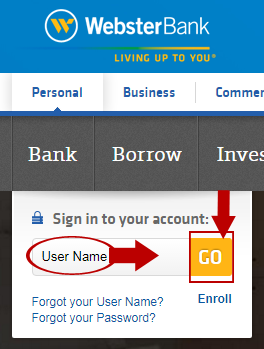
- Visit the Webster Bank website, www.websteronline.com. The Webster Bank login menu is on the left of the www.websteronline.com landing page.
- Type your Wesbter online banking account username into the User Name field.
- Click the blue Go button.
- Enter the password of your Webster online banking account in the Password field.
- Press Enter or click the button to complete the sign in process.
Webster Bank Mobile Online Banking Login Guide
Accessing your banking account from your mobile device is also a simple task. The following instruction will guide you through the mobile Webster Bank login process:
- Visit the Webster website, www.websteronline.com, your device’s web browser.
- Type your username into the User Name field.
- Click the blue Continue button.
- Enter your Webster online banking account password in the Password field.
- Press Enter or click the button to complete the sign in process.
Webster Bank also has a mobile application available for both Apple and Android devices. The following instructions will guide you through the mobile application login process:
Webster Bank Mobile Login Guide for Apple Devices
- Download the Webster Bank mobile app in the Apple App Store.
- Tap Open or select the blue Webster ”W” icon to launch the Webster mobile banking app.
- Select the First time login? Click here. option if it is your first time logging in. This will allow you to fill out the Webster online banking login portal as normal and select a four-digit passcode to use for future app logins.
- Enter your username in the Enter Username box.
- Tap to toggle the Remember my Username toggle switch if desired.
- Click the yellow Sign In button.
- Enter your four-digit access code to complete the Webster Bank login process.
Webster Bank Mobile Login Guide for Android Devices
- Locate the Webster Bank Mobile application in Google Play.
- Select Install and Open to access the application. After the initial download, you can access the app using the blue Webster “W” icon.
- If this is the first time your are using the Webster BAnk app, select First time login? Click here. Input your Webster Bank login credentials and four-digit passcode. This is the login information you will be using when you access the Webster Bank online banking service via the app.
- In the Enter Username box, write the username associated with your Webster Bank online banking account.
- Tap to toggle the Remember my Username option if you would like the Webster Bank login form to rememeber your username for future logins.
- Click the yellow Sign In button.
- Enter the four-digit access code to complete the login process.
Webster Online Banking Login Trouble
Webster Bank offers a variety of online assistance links if you are experiencing any trouble logging in to their online banking system. If you are having trouble with your Webster Bank login credentials, you can get assistance using their Forgot User Name? or Forgot Password? links to retrieve or reset the information you need. They also offer a helpful online Resource Center with a variety of frequently asked questions and helpful tips. If you are having trouble accessing the web or mobile logins, make sure your browser or application is up to date and that your security settings allow access to the site.
Assistance & Helpful Links
Logging into Webster Bank online banking is a straightforward process. The previous instructions guide you through everything you need to use the Webster Bank login portal or mobile application. The following links will help you access all of Webster’s online features.
• Webster Bank Login Direct Page
• Online Resource Center
For additional assistance, contact Webster Bank customer support:
• By Phone: 1-800-325-2424
• Online Form
Leave a Reply