Managing your account online with Royal Bank has many advantages. You can perform a variety of tasks like making mortgage payments, checking account balances, and completing online bill transfers. This article is going to explain the login process for Royal Bank online banking. It will cover both traditional devices and mobile device options.
Royal Bank Online Banking Login Portal: Step-by-step Guide
Getting into your Royal Bank online account is a fairly easy process. Simply follow these steps to access it.
- Visit the Royal Bank website at www.rbcroyalbank.com.
- If you are new to online banking, you must complete the registration process by clicking the “Enrol Now” link on the left-hand side of the page. It will require your account number or debit card number, and personal information to complete.
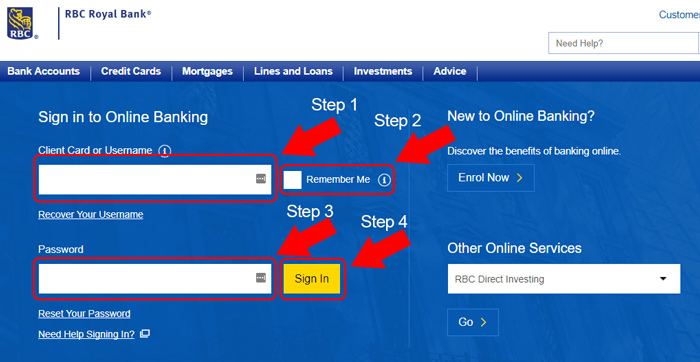
- When you are ready, click the blue “Sign In” button.

- Enter either your ATM card number or username, and password. Click the yellow “Sign In” button to complete the login process.
Royal Bank Mobile Online Banking Login Guide
One terrific feature of Royal Bank is that you can manage your account online from virtually any compatible mobile browser. They also have apps for both Android and iOS devices that make managing your account simple and convenient. To access your Royal Bank account from a mobile browser, follow these steps.
- Visit the Royal Bank online banking homepage using your preferred mobile browser.
- Select the blue “Sign In” button to be taken to the account credentials page.
- Enter your username or debit card number and password, and select the yellow “Sign In” button to complete the login process.
The login process for both the iOS and Android apps is very similar. You can also register for online banking using both of these apps. To get started using them, follow these steps.
Royal Bank Mobile Login Guide for Apple Devices
- Go to the Apple App Store using your favorite iOS device and download the app.
- Allow the download and installation process to complete, and then locate the Royal Bank logo on your device. Tap it to launch the app.
- If you need to register for the first time, select the blue “Enrol” link on the bottom of the app and complete the process using your debit card number or account number.
- When ready to sign in, enter your debit card number or username, and password. Simply tap the blue “Sign In” button to complete the process.
Royal Bank Mobile Login Guide for Android Devices
- Using your preferred Android device, visit the Google Play Store and download the app.
- Once the installation and download process completes on your device, locate the Royal Bank app logo and tap it to launch the app.
- For first-time mobile bank users, complete the registration process by tapping the blue “Enrol” link at the bottom of the app.
- Once your account is registered, enter your username or debit card number, and password. Once entered, tap the blue “Sign In” button to finish logging in.
Royal Bank Online Banking Login Trouble
For the most part, logging into your Royal Bank online account is very straightforward with very few problems. The most common problem you may encounter is a locked account or forgotten password. Fortunately, you can fix both of these issues by clicking the “Reset Your Password” link on the sign in page and following the instructions.
If you are having problems remembering your username, you can recover it using the “Recover Your Username” link. You will need to know your registered email address and card number to complete the process.
Assistance & Helpful Links
By following the steps outlined in this article, you should be well on your way to taking advantage of all the nifty features that online banking has to offer. One important link worth saving is the customer service section. In it, you will find answers to the most common questions you may have. The branch and ATM locator is another useful link to have for those of you who travel regularly.
Leave a Reply