Prosperity Bank offers many different ways to manage your account online. You can use their full-service website from your desktop or laptop, access a mobile friendly page, or take advantage of their feature rich mobile apps for Android and iOS devices. This article is going to serve as your guide throughout the Prosperity Bank online banking login process. It will contain steps for all of the login methods mentioned so far, and offer several useful links as well.
Prosperity Online Banking Login Portal: Step-by-step Guide
Logging into your Prosperity Bank account is a straightforward process. Simply follow these steps:
- Access Prosperity Bank’s website at www.prosperitybankusa.com.
- If you have never accessed your Prosperity account online before, complete the registration process by clicking the “Enroll” link below the login area. You will need to accept a few pages of terms, and have your account number and other personal details to complete this step.
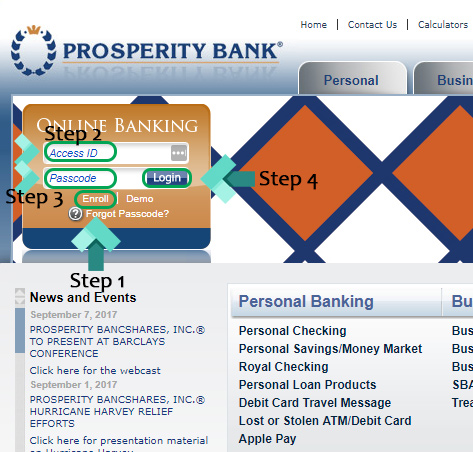
- Now that you’re registered, enter your “Access ID” and “Passcode”.
- Click the blue “Login” button to be taken to the account summary dashboard page.
Prosperity Bank Mobile Online Banking Login Guide
Prosperity Bank also has several great mobile banking solutions for you to try. You can easily access their site using your favorite mobile browser or take advantage of the enhanced functionality their mobile apps offer. To log in using a mobile browser, follow these steps.
- Using your favorite mobile browser, go to the Prosperity Bank mobile login page.
- Enter your “Access ID” and “Passcode”.
- Select the “Login” button to finish the process and access your account.
For both the iOS and Android apps, you will find that the login process is fairly similar. To get started using both of these apps, follow the instructions below.
Prosperity Mobile Login Guide for Apple Devices
- Download the application by visiting the Apple App Store.
- Wait for the download and installation of the app to finish. When it is ready, tap the Prosperity Bank logo to launch the app.
- Enter your login credentials and tap “Continue” to finish signing in.
Prosperity Mobile Login Guide for Android Devices
- Visit the Google Play Store and download the app to your favorite device.
- Once the download and installation have completed on your device, launch the app by tapping the newly installed Prosperity Bank logo.
- Enter both your “User ID” and “Passcode”. Tap “Continue” to finish the login process.
Prosperity Bank Online Banking Login Trouble
You should very rarely encounter any major problems when signing into your Prosperity account. The most common problem users may experience is a compromised or forgotten password. Fortunately, you can fix this problem from the Prosperity Bank website.
Simply click the “Forgot Password?” link on the homepage. You will need your account number, registered email address, and access ID to complete this process. If you have problems with the user ID portion, you can contact customer service at 1-800-531-1401.
Assistance & Helpful Links
By following the steps outlined in our guide, you should now have access to your Prosperity Bank account. Their website is loaded with tons of helpful resources that are worth looking at. If you’re new to online banking, consider their demo page, which has information on the miscellaneous banking tasks you can manage online. You can also find important contact numbers and location information in the Contact Us section.
Leave a Reply