One West Bank has invested heavily in their online banking technology in recent years. You can easily perform a variety of account functions from the comfort of your own home. Getting started with the One West Bank login process only takes a few minutes of your time. This article is going to detail the steps necessary to access your account using a traditional computer, as well as mobile devices.
One West Bank Online Banking Login Portal: Step-by-step Guide
To access your account at One West Bank, follow these steps.
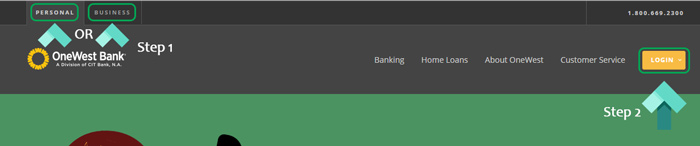
- Visit the One West Bank website at www.onewestbank.com.
- Click the “Personal” or “Business” tab based on your account type in the top left corner.
- Click the yellow “Login” button in the upper right-hand corner and select “Personal Banking”. For business users, just clicking the “Login” button will take you to the next step.
- If you haven’t accessed your account online before, click the blue “Sign Up” link and complete the registration process.
- Enter your user ID and click “Continue”.
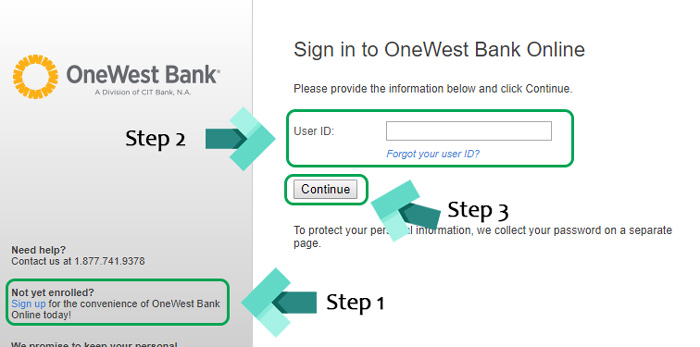
- Input your password to finish signing in.
OneWest Bank Mobile Online Banking Login Guide
In addition to accessing your One West account using standard computers, you can also manage it from your mobile device. There are also apps for Android and iOS devices. To access it from a mobile device, follow these instructions.
- Access the OneWest login page above using a mobile browser.
- Select the yellow “Login” button.
- Enter your user ID.
- Enter your password to finish signing in.
Both the Android and iOS apps are very easy to use and have similar login steps. To get started with these apps, follow these steps.
OneWest Mobile Login Guide for Apple Devices
- Using your favorite iOS device, download the app from the Apple App Store.
- Follow the on-screen prompts and wait for the installation to complete.
- Launch the app by tapping the One West Bank logo.
- Enter your “User ID” and “Password”.
- Tap “Continue” to finish signing in.
OneWest Mobile Login Guide for Android Devices
- Using an Android device, download the app from the Google Play Store.
- Wait for the installation to complete on your device.
- Once it’s done installing, launch the app by tapping the One West Bank logo.
- Enter your login credentials and tap “Continue” to finish signing in.
One West Online Banking Login Trouble
The most likely problem you may encounter with online banking is a forgotten user ID or password. For forgotten user IDs, click the blue “Forgot Your User ID?” link and fill out the required information to retrieve it.
For password issues, enter your user ID and click the unique “Forgot Password” link. Each link is unique, based on your user ID credentials. For additional login help, customer service can be reached at 1-800-669-2300.
Assistance & Helpful Links
By following these simple steps, you should now have access to the One West Bank login webpage and your account on all of your favorite devices. The One West website is loaded with tons of useful links that can further help you with online banking. The FAQ area is one section that is very helpful to new users. To find ATMs, the branch locator is another useful link no one should be without.
Leave a Reply