Landmark Bank has a wide range of online banking features that are very convenient. You can transfer funds, check your balance, and even schedule payments. There are also many great resources to explore on their site. This article is going to explain how to get started with Landmark Bank online banking. We will cover a variety of different online account access methods in our guide.
Landmark Bank Online Banking Login Portal: Step-by-step Guide
Getting started with online banking at Landmark Bank takes a few moments. Simply follow these steps.
- Visit the Landmark Bank website at www.landmarkbank.com using your favorite web browser.
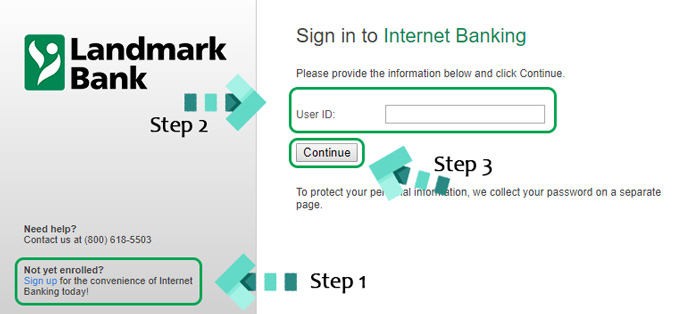
- For new online banking users, complete the registration process by clicking the gray “Enroll” link. You will need your account and personal information to complete the registration fields.
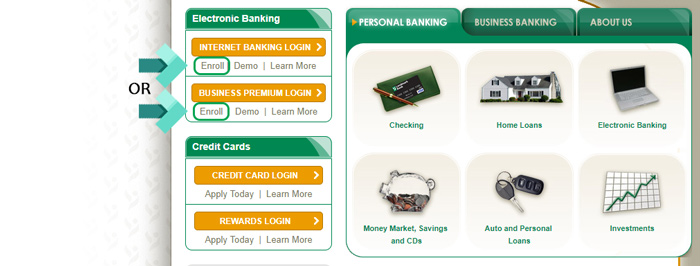
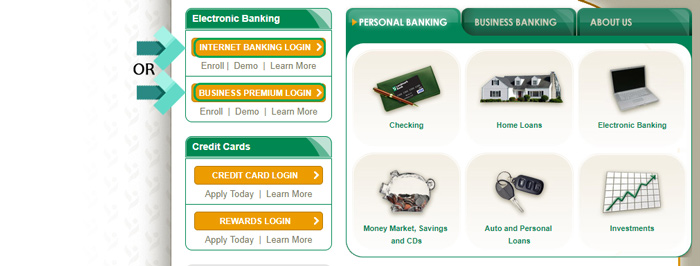
- Click either the yellow “Internet Banking Login” or “Business Premium Login” button based on your account type.
- Enter your user ID and click the “Continue” button.
- You may have to enter a one time security code if this is your first time using this computer. The process is completed using your registered phone number.
- Enter your password and click the “Sign In” button to finish.
Landmark Bank Mobile Online Banking Login Guide
For your convenience, you can also access your account from mobile devices. There are also apps available for both Android and iOS devices. To access your account using a mobile browser, follow these steps.
- Access the Landmark Bank mobile banking login page.
- Select the “Mobile Banking” option.
- Enter your login credentials and select “Continue” to finish.
The login steps for both the Android and iOS apps are similar and very easy to follow. To get started with these apps, follow these instructions.
Landmark Bank Mobile Login Guide for Apple Devices
- Using your favorite iOS device, visit the Apple App Store and download either the personal or business app.
- Follow your device prompts and wait for the download and installation process to complete.
- Launch the app by tapping the Landmark Bank logo.
- Enter your login credentials and tap the black “Continue” button in the top right-hand corner to finish the process.
Landmark Bank Mobile Login Guide for Android Devices
- Download the personal or business app from the Google Play Store based on your account type.
- Follow the instructions on your device and wait for the app to finish installing.
- Launch the program by tapping the app icon.
- Enter your user ID and password. Once entered, tap “Continue” to finish signing in.
Landmark Bank Online Banking Login Trouble
Logging into your online banking account at Landmark is fairly straightforward. The most frequent problem users experience has to do with accidentally selecting the wrong account type. Make sure you are selecting person and business correctly during the login process. There are completely separate mobile apps that are not cross compatible as well.
For issues like forgotten passwords or user IDs, you will need to contact customer service at 1-800-618-5503. Be sure to have your account number handy to assist with verifying your identity.
Assistance & Helpful Links
By following these simple steps, you should now have access to your online Landmark Bank account. If you’re still nervous about getting started, there is a handy demo that you can explore to get a feel for online banking without an account. The online banking FAQ is another great resource worth saving.
Leave a Reply