The Key Bank login portal takes your local bank branch and makes it available to you on your desktop or mobile device. Key Bank online banking lets you embrace your financial wellness by checking account balances, managing alerts, sending electronic and check payments, setting up eBills, and so much more. This straightforward guide will walk you through all the instructions you need to get started.
Key Bank Online Banking Login Portal: Step-by-Step Guide
With your online banking username and password, it is easy to log into the Key Bank system and access your account. Follow these steps:
- Visit the Key Bank sign on portal at accounts.key.com.
- Type your username into the User ID box.
- Enter your password in the Password box.
- Check the Save User ID checkbox to save your login name if desired.
- Click the red Sign On button to login.
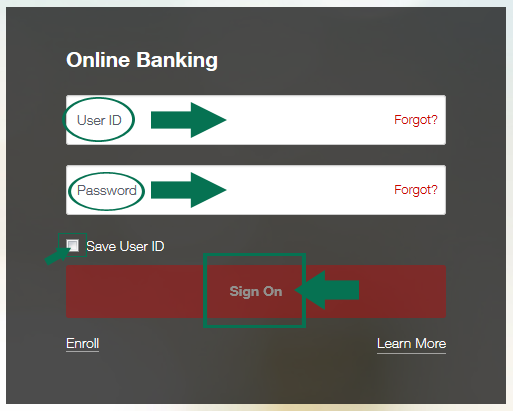
You can also access the Key Bank login screen from their banking website. Follow these steps:
- Visit the Key Bank website at www.key.com.
- Locate the red Go to online banking button in the left column.
- Type your username into the User ID box.
- Enter your password in the Password box.
- Check the Save User ID checkbox to save your login name if desired.
- Click the red Sign On button to login.
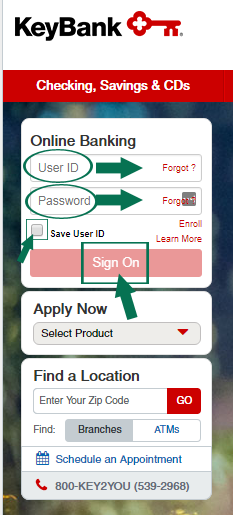
Key Bank Mobile Online Banking Login Guide
The Key Bank sign on portal is also available for mobile login. Follow these steps:
- Visit the portal using your mobile devices’ web browser and going to www.key.com.
- Click the red Sign On button in the upper right corner of the screen.
- Type your username into the User ID box.
- Enter your password in the Password box.
- Check the Save User ID checkbox to save your login name if desired.
- Click the red Sign On button to login.
If you have an Apple or Android mobile device you can also use the Key Bank application to access all the features of online banking right from your smartphone or tablet. Follow these steps:
Key Bank Mobile Login Guide for Apple Devices
- Search for Key Bank Mobile in the App Store.
- Click Get and then Install to add the application to your device.
- Select Open or click the white icon with the red key to open the application.
- Type your username into the User ID box.
- Enter your password in the Password box.
- Check the Save User ID checkbox to save your login name if desired.
- Click the red Sign On button to login.
Key Bank Mobile Login Guide for Android Devices
- Search for Key Bank Mobile in Google Play.
- Click Install to add the application to your device.
- Select Open or click the white icon with the red key to open the application.
- Type in your username and password and click the red Sign On button to login.
Key Bank Login Trouble
Trouble accessing the Key Bank website is generally caused by browser or Internet provider issues. If you run into these issues, be sure your browser is updated to the latest version. You may also need to modify your security settings for Key Bank login to allow cookies and pop-ups. Key Bank offers several helpful options for trouble logging in. If you do not have a username and password yet, use the Don’t have User ID? link. You can use the Forgot? link if you are having issues with your username or password. Further assistance is available on the Frequently Asked Questions page. You can also reach Key Bank’s online banking support team at 1-800-539-1539.
Assistance & Helpful Links
These simple steps will have you successfully using the Key Bank login to manage your accounts, pay bills, and take full advantage of the other features of Key Bank online banking.
You can reach Key Bank’s customer service team for assistance:
• By Phone at 1-800-KEY2YOU (539-2968)
• Phone for Online Banking at 1-800-539-1539
• By Email Form
Leave a Reply