Accessing your Centier online banking account has many great benefits. You can quickly transfer funds, review your account balances, and send payments, all from one convenient location. Fortunately, accessing your account online is a very simple process. The purpose of this guide is to offer you an in-depth overview of the login process for Centier online banking for a variety of popular device types.
Centier Mobile Online Banking Login Portal: Step-by-step Guide
To quickly and easily access your Centier online banking account, follow these simple steps.
- Visit the Centier online banking portal.
- If this is your first time ever accessing your account online, click the yellow “Sign-up” link to complete the registration process. You will need personal information like your social security number to complete this process.
- Once you have registered your account, click the orange “Sign In” button at the top right-hand corner of the screen.
- Enter your “Username” and “Password”.
- Click the yellow “Log-in” button to complete the sign in process.
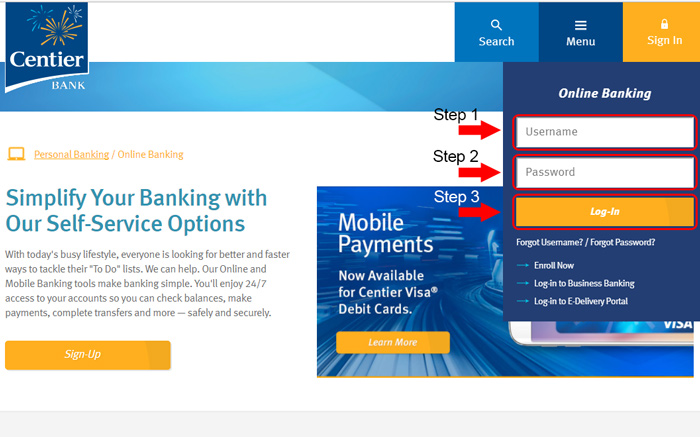
Centier Mobile Online Banking Login Guide
One of the best things about Centier is that you can also access your account from virtually any mobile browser. They also have useful apps for Android and Apple devices that are worth checking out. To access your account from your mobile browser, follow these steps.
- Navigate to the Centier homepage at www.centier.com using your mobile browser.
- Select the orange “Sign-in” button to access the account credentials screen.
- Enter your “Username” and “Password”.
- Select “Log-in” to complete the authentication process.
Centier has specialized apps for both Android and iOS devices. With the exception of the download location, you will find that the login process is virtually identical between the two apps.
Centier Mobile Login Guide for Apple Devices
- Visit the Apple App Store and download the mobile application.
- Once the download and installation of the app are completed, look for the Centier banking logo on your device and tap it to start the app.
- If this is your first time accessing your account online, tap the “Sign Up” button and complete the fields to register your account for online access.
- When you are ready, enter your existing username and password and tap “Sign In” to complete the login process.
Centier Mobile Login Guide for Android Devices
- Go to the Google Play Store and download the mobile application.
- Wait for the download and installation process to complete, and then select the Centier banking logo that should now be showing on your device.
- For those of you who haven’t accessed your account online before, tap the “Sign Up” link and complete the registration process first.
- To access your account, simply enter your username and password and tap “Sign In” to be taken to your account summary page.
Centier Online Banking Login Trouble
For the most part, logging into your Centier account is a fairly easy process with very few issues. The most common issue you will encounter is forgotten passwords. To reset your password, click the “Forgot Password?” link and fill out the requested information.
Another common login problem is forgotten usernames. You can recover your username by clicking the “I forgot my username” link and following the instructions on the screen. The blue forgotten username link is in the lower right-hand corner. It will send you your registered username to the email address you have on file.
Assistance & Helpful Links
By following these simple steps in our guide, you should now have access to your Centier online banking account. Once inside, you can begin taking advantage of all the useful features their online service provides. One area worth checking out is their customer service section that has several important phone numbers for your convenience. They also have a great interactive demo that can help you familiarize yourself with a variety of popular banking features.
Leave a Reply