Hanmi Bank was founded in 1982 and represents a pylon for the Korean-American service model. They aim to contribute as much as possible to the community and provide quality services. For that reason, they own an online platform, easily accessible by any customer.
This guide wishes to guide newcomers into accessing their accounts by offering detailed steps for each action that needs to be followed to complete the Hanmi Bank online login process. If you’re new to the world of online transactions, follow the instructions below:
Hanmi Bank Online Banking Login Portal: Step-by-step Guide
If you follow these steps, you will gain access to your online banking account in no time:
- Go to Hamni Bank’s official homepage.
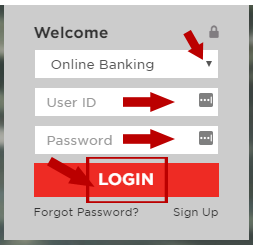
- You will see a red box into the left panel. Into the first drop-down menu, be sure to have Online Banking selected.
- The next field is where you should type your User ID.
- After you’ve finished that, type in your password below.
- Click on Login and you’re all set.
Hanmi Bank Mobile Online Banking Login Guide
The same process is available from your mobile device. Just be sure to have your java-script enabled.
- Open the Hanmi Bank website or locate it through your browser.
- Zoom on the red box and select Online Banking from the drop-down menu.
- Tap on the first field and input your User ID.
- Press the field below and write your password.
- You can now press on Login and access your account.
You can also access your account from an application with your Android or Apple device. Look at these steps to see the process:
Hanmi Bank Mobile Login Guide for Android Devices
- Open the Play Store and locate the app “Hanmi Mobile Banking”
- Install the app and open it.
- It will prompt a login form that you must complete. Press the first field and type your Login ID.
- Into the “Password” field, input your password.
- Press on the red Log In button.
*Note that you can also create a passcode and you won’t be needed to insert your credentials every time you access the app.
Hanmi Bank Mobile Login Guide for Apple Devices
- Find the Hanmi Mobile Banking app on the App Store.
- Download the app and open it after it’s installed.
- Press the first field and type in your Login ID
- Tap the field below and write your personal password.
- Press the red Log In button (be aware that you can select whether you want to be authenticated each time you open the app by toggling the Remember me bar)
Hanmi Bank Online Banking Login Trouble
There’s many issues that can occur while trying to access your account. For example, your browser java-script might not be enabled or you’ve lost your password. Any issue should be addressed to their company. You can contact them from this support page.
Assistance & Helpful Links
For further questions, you can check out this page. They offer information about additional services and security issues. Keep in mind that if you have your card lost or stolen, you should immediately contact Hanmi Bank to get help.
Leave a Reply