Ally Bank offers a variety of useful features through their online and mobile banking option. Whether you need to pay a bill, transfer funds, or just check out your account balances, Ally online banking makes the process user-friendly while keeping your account information secure. The following step-by-step guide will walk you through the process.
Ally Online Banking Login Portal: Step-by-Step Guide
Accessing online banking is secure and simple using Ally’s login portal. The following steps will guide you through the process:
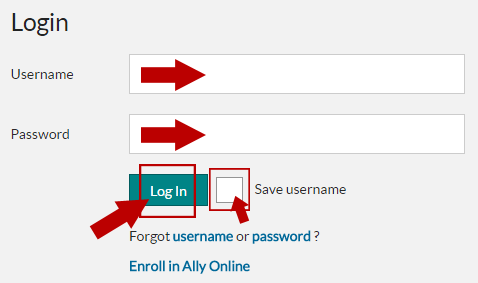
- Navigate to the Ally Bank login portal.
- Provide your username in the Username field.
- Click to check the Remember username check box if you want to save your login information.
- Type your password into the Password field.
- Click the Log In button.
You can also login to Ally Bank’s online banking platform from their corporate website. The following steps will guide you through the process:
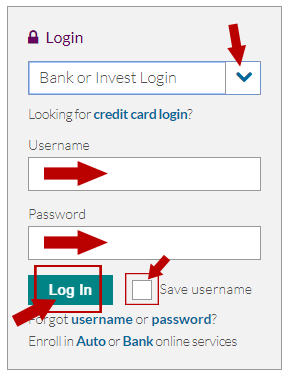
- Navigate to the Ally Bank homepage.
- Locate the Login box in the upper, right of the page.
- Choose the appropriate option from the Select Account drop-down menu.
- Provide your username in the Username field.
- Type your password into the Password field.
- Check the Save username box if desired.
- Click the Log In button.
Ally Mobile Banking Login Guide
You can also easily use the Ally Bank login from almost any Internet-connected mobile device, including your smartphone or tablet. The following steps will guide you through the process:
- Navigate to the Ally Bank homepage using your mobile device’s web browser.
- Click the green Log In button in the upper-right corner of the screen.
- Select the appropriate account type from the Select Account drop-down menu.
- Fill out the Username and Password fields.
- Tick the Save username check box if desired.
- Tap the green Log In button.
Ally Bank also has a mobile application for both Apple and Android devices, which makes banking on the go even easier. The following steps will guide you through the process to log in using the mobile application:
Ally Mobile Login Guide for Apple Devices
- Download the Ally Mobile Banking application from iTunes or the App Store.
- Launch the app by tapping the purple “a” icon.
- Provide your username in the Username field.
- Type your password into the Password field.
- Check the Save Username checkbox if desired.
- Tap the Next button to login.
Ally Mobile Login Guide for Android Devices
- Download the Ally Mobile Banking application from Google Play.
- Launch the app by tapping the purple “a” icon.
- Fill out the Username and Password fields.
- Check the Save Username checkbox if desired.
- Tap the Next button to login.
Ally Online Banking Login Trouble
For the best user experience, make sure your web browser or mobile application is updated, and your Internet connection is functioning properly. You may also need to adjust the security settings to allow cookies and pop-ups from Ally’s website. For username or password issues, the following links may be helpful:
- Click Enroll to receive your username and password
- Tap Forgot your password? to reset your login information
- Click Help for additional assistance and answers to frequent questions
Assistance & Helpful Links
With this handy login guide, you have all the instructions to get logged in and take advantage of the benefits and features of Ally Bank’s convenient online banking platform. The following links will guide you to where you need to go to get started:
You can also contact Ally’s customer service team 24 hours a day:
- Phone: 1-877-247-2559
Leave a Reply