Santander Bank is a Boston-based bank whose parent company is the Spanish Santander Group. The bank was previously known as Sovereign Bank before it rebranded as Santander Bank on 17th October 2013. Its primary market is the northern United States where it offers its clients an assortment of financial products and services including corporate banking, retail banking, credit card, insurance and cash management just to name a few. Many of these services can be accessed through the Santander online banking feature. This guide provides instructions for the Santander online banking login procedure.
Santander Online Banking Login Portal: Step-by-step Guide
The process of accessing Santander Bank online is very simple. Here are the instructions for getting to the bank’s platform:
- Open your browser and go to the Santander website. You can reach at www.santanderbank.com
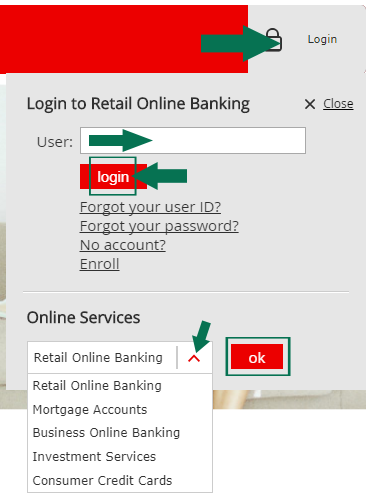
- Click the grey tab marked Login, located on the right of the www.santanderbank.com landing page. This will bring down the Santander online banking login menu.
- By default, the login menu is set to online banking. From the drop-down menu at the bottom you can select a different type of account if you wish.
- For personal clients, enter your online banking User ID and click the red ‘Submit’ button.
- Enter your Santander online banking account password and click the ‘Submit’ button to complete the Santander account login process.
- For business and corporate clients, enter your organization ID and the user ID, then press the red ‘Submit’ button.
- Enter the password to proceed with business or corporate banking.
Santander Mobile Online Banking Login Guide
Santander clients can also manage their money when and where it is convenient through the secure mobile banking platform offered by the bank. Santander has mobile apps for iPad, iPhone, and Android devices as well as a dedicated mobile banking web page for those using Blackberry, Android tablet, and Windows phone.
Here is a step-by-step guide for accessing your Santander online banking account through your mobile device.
- Open your mobile browser.
- Open the www.santanderbank.com website.
- Click the grey Login button.
- Proceed to fill in your Santander online banking login credentials or select a new type of account from the drop-down menu.
- Enter your user ID for personal banking or the organization ID and user ID for business and corporate banking.
- Click the ‘Ok’ button.
- Enter your password and tap the ‘Submit’ button to complete the Santander online banking login process and access your online banking account.
As mentioned earlier you can download and install Santander mobile apps to access your account easily. Here is a guide to follow to log into your Santander account online via your mobile device.
Santander Mobile Login Guide for Apple Devices
- Head to App Store and download the Santander Mobile app for your Apple device.
- Install the app and run it on your iPad or iPhone.
- Follow the login instructions displayed on your mobile.
- Enter your Santander online banking login information in the login form.
Santander Mobile Login Guide for Android Devices
- Go to Google Play and download the Santander mobile banking app for Android.
- Install the Santander app on your preferred Android device.
- Run the app and fill in your user ID for personal banking or organization ID and the user ID for business and corporate banking.
- Click ‘Ok’ and enter your Santander online banking account password.
Santander Online Banking Login Trouble
While online banking is easy and the fastest way to access your bank account, several problems may arise when logging into your online account. One of the most common challenges you may encounter while accessing your account is a forgotten password. To retrieve your password, simply go to the ‘reset password’ option to create a new password.
Some clients experience a blank screen issue when attempting to access Santander Bank online. This may be because of an incompatible browser or operating system. You can take full advantage of online banking by using recommended browsers such as Mozilla Firefox, Safari 8.0, Google Chrome and Internet Explorer 8, 9 and 11. If you are using any of these browsers and still experience a problem, try cleaning out cache and cookies or reset the browser.
If this does not work the cause of the blank screen may lie with the firewalls or proxy servers. Contact your Internet service provider Data Processing Department concerning the problem or access your online account from a different location.
Assistance & Helpful Links
Accessing your Santander online account does not have to be a problem. In case you experience any hitch while logging in to your account, can contact a customer care agent at 1-877-768-2265. Alternatively, you can go to the Santander contact and support page for more help.
Leave a Reply