NBT Bank has been in the banking industry since 1856. The bank has its main office in New York and also has offices in Pennsylvania, Vermont, Massachusetts and New Hampshire. The NBT online banking platform offers its clients the possibility to view their account balances, pay bills, send money, enroll in eStatements, receive account alerts via email, and many more useful benefits.
This guide will teach you how to access your NBT Bank online account through an easy step by step process.
NBT Online Banking Login Instructions
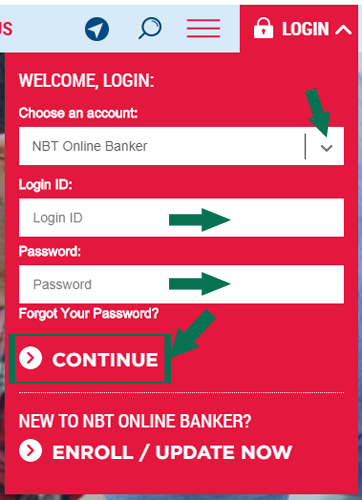
Follow these steps to log into NBT online banking.
- Navigate to the www.nbtbank.com homepage.
- Select Account Login at the top right side of the screen.
- Click on NBT Online Banker.
- Enter your username and password into the provided fields.
- Click on “Continue”.
NBT Mobile Login Instructions
The NBT online banking login process is similar on your mobile. Your NBT account can be accessed through the regular browser or by using the apps provided by NBT Bank. Follow these steps:
1. Through your device’s web browser, go to m.nbtbank.com
2. Press on MOBILE LOGIN field and enter your username.
3. Tap on MOBILE PASSWORD and insert your password.
4. Press the LOGIN button.
Besides using your mobile browser, you can access NTB Mobile Banking by downloading and installing the NTB Mobile app. Here is a detailed step-by-step guide to accessing your NTB account on your mobile.
NBT Mobile Login Instructions for Apple Devices
1. Go to the Apple iTunes on your iPhone or iPad and download the NBT Bank Mobile Banking app.
2. Install the app on your preferred iOS device
3. After you open the app, press on Username and input your username.
4. Go to the Password field below and enter your password.
5. Press on Log In to access the NBT dashboard.
NBT Mobile Login Instructions for Android Devices
1. Visit the Google Play Store on your Android smartphone or tablet and download the NBT Bank app.
2. Install the app on your preferred Android device.
3. Open the app. Tap on Username and insert your id.
4. Press on Password and write in your personal password.
5. Hit the grey Log In button.
NBT Online Banking Login Issues
There are many issues that can occur while trying to access the NBT online banking. Here are a few troubleshooting steps you can take:
- For the NBT forgotten password, click on Forgot Your Password?
- Be sure to have JavaScript enabled on your browser and have the latest version installed.
- Have your computer date set to the current day. Sometimes, if your computer time differs from the internet, you cannot access your account due to sync errors.
- Check if the NBT website is working properly with this tool.
Useful Details and Links
Visit NBT Banks official website to find more information concerning their online banking platform. For pressing issues, you can contact them through their customer support number – 180 0628 2265 or their customer support page.
If you’re a new user and wish to get started with the enrollment process, follow this link to enroll. If your issues still haven’t been solved, sending them an email can be a solution.
Leave a Reply