Bremer online banking is one way the bank has added convenience and value for their customers. With useful features like online statements and check and deposit viewing Bremer makes keeping an eye on your money easy. Additionally, the online banking and mobile banking platforms offer useful services like transfers, bill pay, alerts, and more. This handy guide will provide you all the instructions you need to complete the Bremer Bank login procedure that will allow you to access their online banking platform.
Bremer Online Banking Login Portal: Step-by-Step Guide
The Bremer login portal provides fast, secure access to all online banking features. Use the following step-by-step instructions to log in to online banking:
- Visit Bremer Bank’s website, www.bremer.com
- Locate the Login section in the column on the right side of the page.
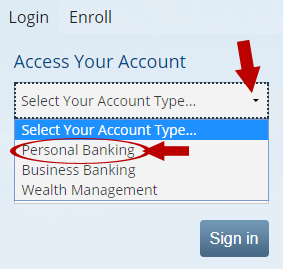
- Open the Select Your Account Type drop-down menu by clicking the arrow.
- Select Personal Banking to access your Bremer online banking account.
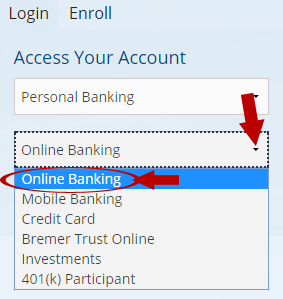
- Select Online Banking from the Select Online System drop-down menu, if you are using a computer.
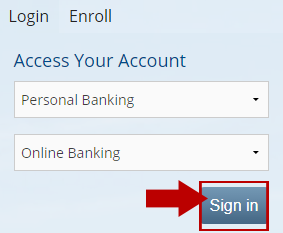
- Click the blue Sign in button.
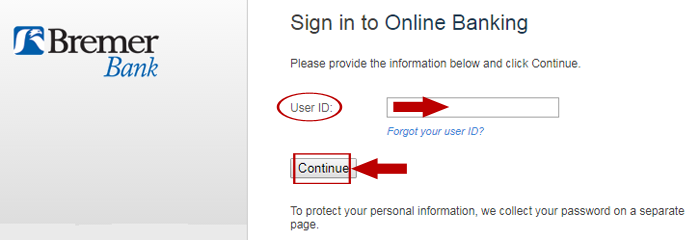
- Fill in the User ID field with your Bremer Bank login credentials.
- Select Continue.
- Provide your password when prompted.
- Click Login.
Bremer Mobile Banking Login Guide
The Bremer login also works when accessed using a mobile web browser on almost any Internet-connected mobile device. Use the following step-by-step instructions to log in from a mobile device:
- Visit the Bremer website at www.bremer.com
- Select Personal Banking from the drop-down menu.
- Choose Mobile Banking from the second drop-down menu.
- Tap the Personal Accounts tab at the bottom of the page. You will be redirected to the Bremer Bank login page for mobile devices.
- Fill in the User ID box with your login credentials.
- Provide your password in the Password box.
- Click Continue.
Bremer Bank also has a mobile application that makes logging in and using online banking features from your smartphone or tablet even easier. Use the following step-by-step instructions to log in using the mobile app:
Bremer Mobile Login Guide for Apple Devices
- Install the Bremer Bank Mobile application on your Apple device. You can find a link to the Bremer Bank app on the Bremer mobile login page.
- Launch the application using the Bremer eagle icon.
- Fill in the User ID box with your login credentials.
- Provide your password in the Password box.
- Toggle on the Save my User ID option if desired.
- Tap the Sign On button.
Bremer Mobile Login Guide for Android Devices
- Install the Bremer Bank Mobile application on your Android device. You can find the app on the Bremer mobile login page.
- Launch the application using the Bremer eagle icon.
- Fill in the User ID and Password boxes.
- Toggle on the Save my User ID option if desired.
- Tap the Sign On button.
Bremer Online Banking Login Trouble
To avoid login trouble when using the Bremer Bank online platform, ensure that your computer or device meets their System Requirements and cookies and JavaScript are enabled. Using an updated version of your web browser or mobile application will also help ensure the best login and user experience. To register for online banking and create the login credentials for your account, use Bremer’s convenient Sign up process. For trouble with logging in or other banking questions, visit the Bremer Help and FAQs page. For further assistance, reach out to Bremer client services by phone at 1-800-908-2265.
Assistance & Helpful Links
If you are having trouble with the Bremer online banking platform or the Bremer Bank login procedure, you should contact Bremer customer support. The Bremer customer service phone number is 1-800-908-2265.
For more information about the Bremer online banking service and Bremer Bank services in general, visit www.bremer.com.
Leave a Reply