TradeKing is a brokerage firm that is now known as Ally Invest once the company was acquired in 2016 by Ally Financial. The company offers an online trading platform for those new to trading and those who are experienced. If you have a TradeKing (Ally Invest) account, then the information provided below will help you learn more about how to TradeKing login page and access your account. More so, it’ll help you understand what you can do to seek help or contact the company if you have other questions.
TradeKing Login Portal: Step-by-step Guide
The following information can help you get into your TradeKing account:
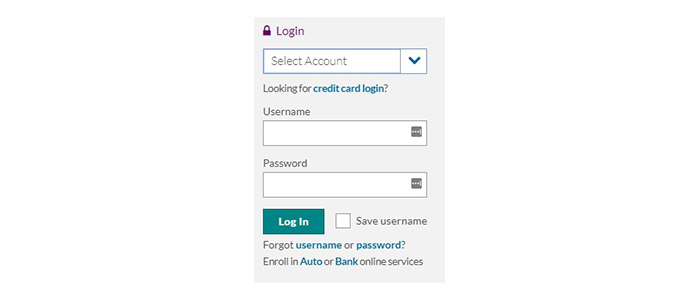
- Visit the Ally Invest webpage on the official Ally Financial website.
- In the upper right-hand corner, select Login to open the menu.
- Under Select Account, choose Bank or Invest Login.

- Enter your Username and your Password.
- You have the option to check Save Username.
- Select Log In.
TradeKing Mobile Login Guide
You can reach your TradeKing login using your mobile device as well:
- Open the Ally Invest webpage at www.ally.com/invest
- Select the Login link at the top right-hand corner.
- Tap on Select Account and choose Bank or Invest Login.
- In the corresponding areas, enter your Username and Password.
- If you want, tap the Save Username box.
- Tap on Log In.
If you want to reach your TradeKing trade account without using a web browser, you can download a mobile app from Ally Financial. This app can be found on Apple and Android devices.
TradeKing Mobile Login Guide for Apple Devices
- Go to the App Store and download the Ally Mobile app.
- Launch the app after finding the purple icon.
- Enter your Username and Password.
- Check the Save Username box if you want.
- Tap on Submit.
- Alternatively, use TouchID to sign in.
TradeKing Mobile Login Guide for Android Devices
- Visit the Google Play Store to install the Ally Mobile app.
- Find the purple icon to launch the app.
- Type in your Username and your Password.
- Select Save Username if you want.
- Select Submit.
- You can also login with Fingerprint.
TradeKing Login Trouble
If there are any technical issues with reaching your TradeKing account with Ally Invest, then you can look to some troubleshooting options. First, you can ensure you’re entering the right username and password. If either of them are wrong, you can try recovering your username by calling 1-855-880-2559, and they’re available 24/7. For password, you can select the “forgot password” link.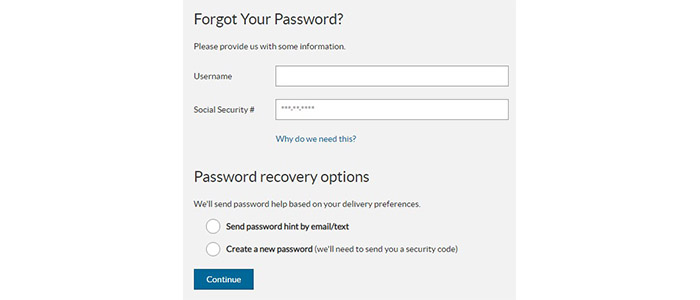
Assistance & Helpful Links
Although TradeKing has been acquired by Ally Financial to become Ally Invest, you can still gain immediate access to your account through the computer or on a mobile device. For mobile use, the company makes it even easier by allowing you to login using a free app on Apple and Android devices.
If you need any help, you can call the phone number found in the previous section to contact the Invest department at any time as they’re open 24/7.
Leave a Reply