There are many tasks that you can complete from the comfort of your home while doing your banking online. Some prime examples include transferring funds, managing automatic payments, and depositing checks. Luckily, WSECU online banking is very easy to use. This article is going to function as a guide with detailed login instructions for both desktop and mobile devices.
WSECU Online Banking Login Portal: Step-by-step Guide
You can set up your WSECU online account and login to it in just a couple of minutes. Simply follow the steps outlined below to complete the process.
- If you’re not a registered user, begin by completing the registration process. You will need your account number, social security number, and card number or temporary password that was given to you by customer service.
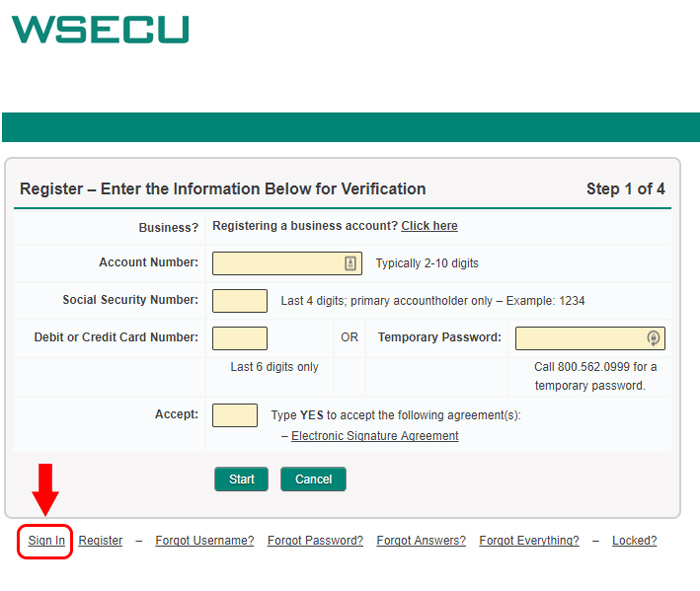
- Once registration is complete, navigate to the WSECU homepage at wsecu.org using your preferred browser.
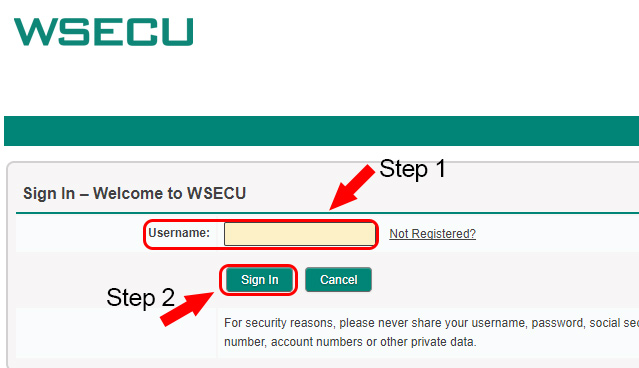
- Enter your online banking “Username” and click the blue “Sign In” button.
- Enter your password and click “Continue”.
- Answer your security question to complete the login process.
WSECU Mobile Online Banking Login Guide
For your convenience, you can also access your WSECU online banking account using a variety of mobile web browsers. They also have both an Android and iOS app that provides improved functionality. To log in using a mobile browser, follow these steps.
- Visit the WSECU homepage linked above using your mobile browser.
- Enter your “Username” and select the blue “Sign In” button.
- Enter your password and select continue.
- Confirm the security question matches what you set up and answer it correctly to complete the login process.
The login process for both of the mobile apps is very similar to the mobile banking steps. To access your account using the iOS and Android apps, follow these steps.
WSECU Mobile Login Guide for Apple Devices
- Begin by downloading the WSECU app from the Apple App Store.
- Once you have downloaded and installed the app, tap the WSECU banking logo to launch the app.
- Enter your “User ID” and “Password”. Tap the blue “Sign In” button to continue.
- Answer your security question to complete the login process.
WSECU Mobile Login Guide for Android Devices
- Using your preferred Android device, download the WSECU app from the Google Play Store.
- Wait for the app to finish downloading and installing. When it does, launch the app by tapping the WSECU bank logo.
- You should now see a screen where you can enter your “User ID” and “Password”. Once entered, tap “Sign In” to continue.
- The last step is to answer your security question correctly to finish the login process.
WSECU Online Banking Login Trouble
For the most part, you should very rarely encounter any login trouble when accessing your WSECU online account. The most common thing you may experience is a forgotten password. You can solve this by visiting the “Forgot Password section” and completing the required fields to set up a new one.
If your account has become locked due to multiple failed login attempts, you will have to contact customer service to fix the problem. You can reach customer service by calling 1-800-562-0999.
Assistance & Helpful Links
By following our walkthrough, you should now have access to your online WSECU account. One important link you may want to save is the help and resources center. In it, you will find helpful articles that cover virtually every element of online banking, ranging from account transfers to funds availability policies. The branch locator is another useful tool to save for when you need to find a WSECU ATM.
Leave a Reply