Managing your Intrust Bank online account has many great benefits. You can do a variety of tasks like review cleared transactions and transfer funds, all from the comfort of your own home. The online banking portion of Intrust is loaded with similar features that make it worth trying out for yourself. The purpose of this article is to give you step-by-step instructions to accessing your Intrust Bank online account. We will also cover mobile access instructions.
Intrust Bank Online Banking Login Portal: Step-by-step Guide
Accessing your Intrust Bank account from your computer is a fairly easy process. Simply follow these steps to gain access to your account in no time.
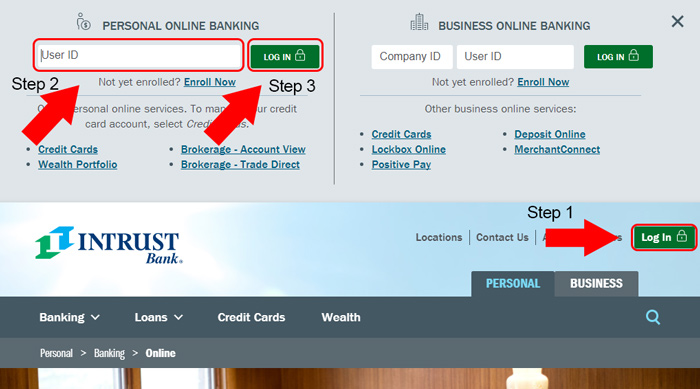
- Visit the Intrust online banking portal at www.intrustbank.com and click the green “Log In” button.
- If you are new to online banking, complete the registration process by clicking “Enroll Now”. Please note that the enrollment process is different for personal and business accounts.
- Once your account is registered, enter your “User ID” for personal accounts. For business accounts, enter your “Company ID” and “User ID”, then click the green “Log In” button.
- The next screen will ask you for your password. Once entered, you should be taken to your account summary page for your personal or business account.
Intrust Mobile Online Banking Login Guide
One of the great things about Intrust is that you can access your account from a variety of popular mobile web browsers. You can also take advantage of their useful Android and iOS apps. To access your account from a mobile browser, follow these steps.
- Visit the Intrust mobile banking website.
- Enter your “User ID” and “Password”.
- Select the gray “Continue” button at the bottom to finish logging in and access your account summary page.
Both the Android and iOS apps are very easy to use and have very similar login procedures. You can access your account using these apps by following the steps below.
Intrust Mobile Login Guide for Apple Devices
- Open the Apple App Store and begin downloading either the business or personal account app.
- Once the download and installation process completes, tap the app’s icon to launch it.
- Enter your “User ID” and “Password” and tap “Log In” to access your account.
Intrust Mobile Login Guide for Android Devices
- Visit the Google Play Store and download the business or personal app depending on your account type.
- Allow the download and installation to complete, and then tap the app icon to launch it.
- You are now ready to enter your “User ID” and “Password”.
- tap “Log In” to complete the login process and access your account.
Intrust Online Banking Login Trouble
Logging into your Intrust online banking account is generally free of hassles. The most common situation you will run into is a locked account or forgotten password. There is typically a “Forgot Password” link you can click after entering your unique username that will allow you to unlock your account. You can also contact customer service at 1-800-895-2265 for additional help.
Assistance & Helpful Links
If you have been following our guide, you should now have access to your Intrust online banking account. Take your time exploring the plethora of useful features that they offer. A great section worth bookmarking is the FAQ area. You can also save the locations page to easily find branches while traveling.
Leave a Reply